
Reference
Blockchain and tokens
IntriFund writes a fingerprint of every ledger entry to a public blockchain, so the money history cannot be changed quietly. This page explains what goes there, how a donation becomes tokens, and how you can check an entry yourself.
What is on the blockchain
Every movement of money is a line in IntriFund’s ledger. Each line is published to a public blockchain. This is called anchoring. Once a line is on the chain, nobody can change it, including us.
| On the chain | Never on the chain |
|---|---|
| A public reference such as LED-3M0W938S, the kind of entry, the program, the amount and the day. | Names, contact details, Member IDs, diagnoses, service names, clinic names, donor names or wallet addresses of donors. |
Anchoring waits 24 hours for every entry. The wait stops anyone from matching a line to one clinic visit or one person. The entry is already in our ledger while it waits, and it is counted in the coverage panel on the Transparency page.
There are two ways an entry can be proved. Some entries have their own transaction on the chain, with a link. Others are grouped in a batch: only one short fingerprint for the whole batch, called its root, is written to the chain, and a proof shows that your entry is inside it.
How a donation becomes tokens
IntriFund has its own digital dollar, USDIntrifund. 1 token is always worth 1 US dollar. A crypto gift already arrives as tokens. A card or bank gift arrives as real money outside the blockchain, so an equal number of tokens is created for it.
Gift received
By card, bank transfer or crypto. It is written to the ledger.
Ledger contract mints
The ledger contract creates the same number of tokens as dollars given, and holds them.
Shown publicly
The entry says Converted to USDIntrifund, with a link to the transaction.
| What the entry says | What it means |
|---|---|
| Converting | The gift is recorded and its tokens are being created. |
| Converted to USDIntrifund | The tokens exist. The link opens the transaction on the blockchain explorer. |
| Paid in tokens | A crypto gift. It arrived as tokens, so nothing more is created. |
Proof of reserves and honest limits
Where it is switched on, the Transparency page has a Proof of reserves panel. It compares the tokens held with what the ledger says IntriFund should hold. Green means the two agree to within one cent and no gift has waited too long to be converted. Amber means they do not, and the panel says why in plain words.
How to verify an entry, step by step
You do not need an account or any special software. The full list is on the Transparency page.
Find the entry
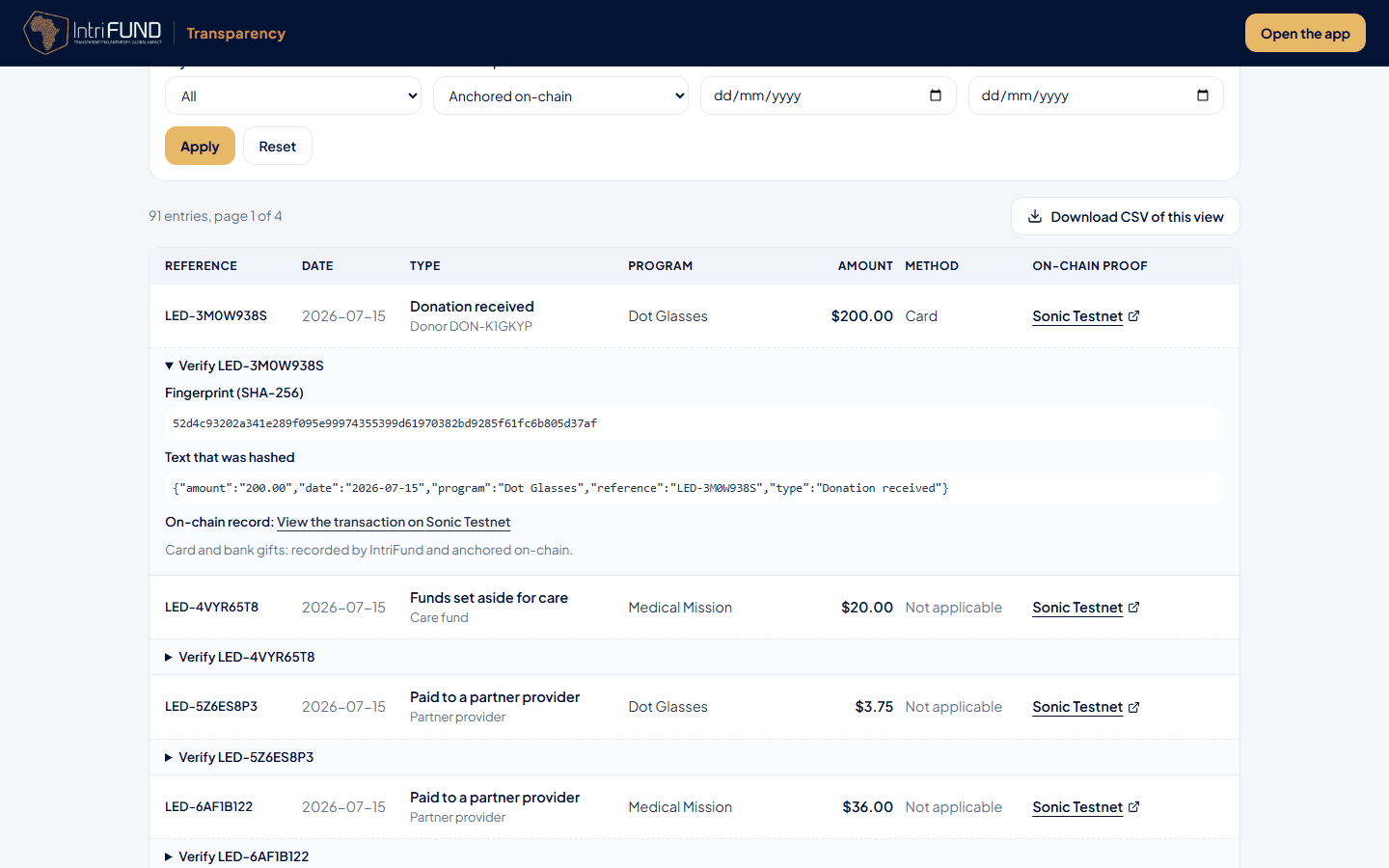
Search by reference, or use the filters. To see only entries that are on the chain, set On-chain proof to Anchored on-chain.
Open Verify under the entry
Press Verify followed by the entry’s reference. A panel opens with the fingerprint (SHA-256) and the exact text that was hashed. This text holds only the public fields.
Check the fingerprint yourself (optional)
Paste the text into any SHA-256 tool. The result must equal the fingerprint shown.
Follow the link to the blockchain
If the entry has its own transaction, the Proof column and the panel show a link named after the chain. Open it and check that the transaction exists.
For a batch entry, press Check in your browser
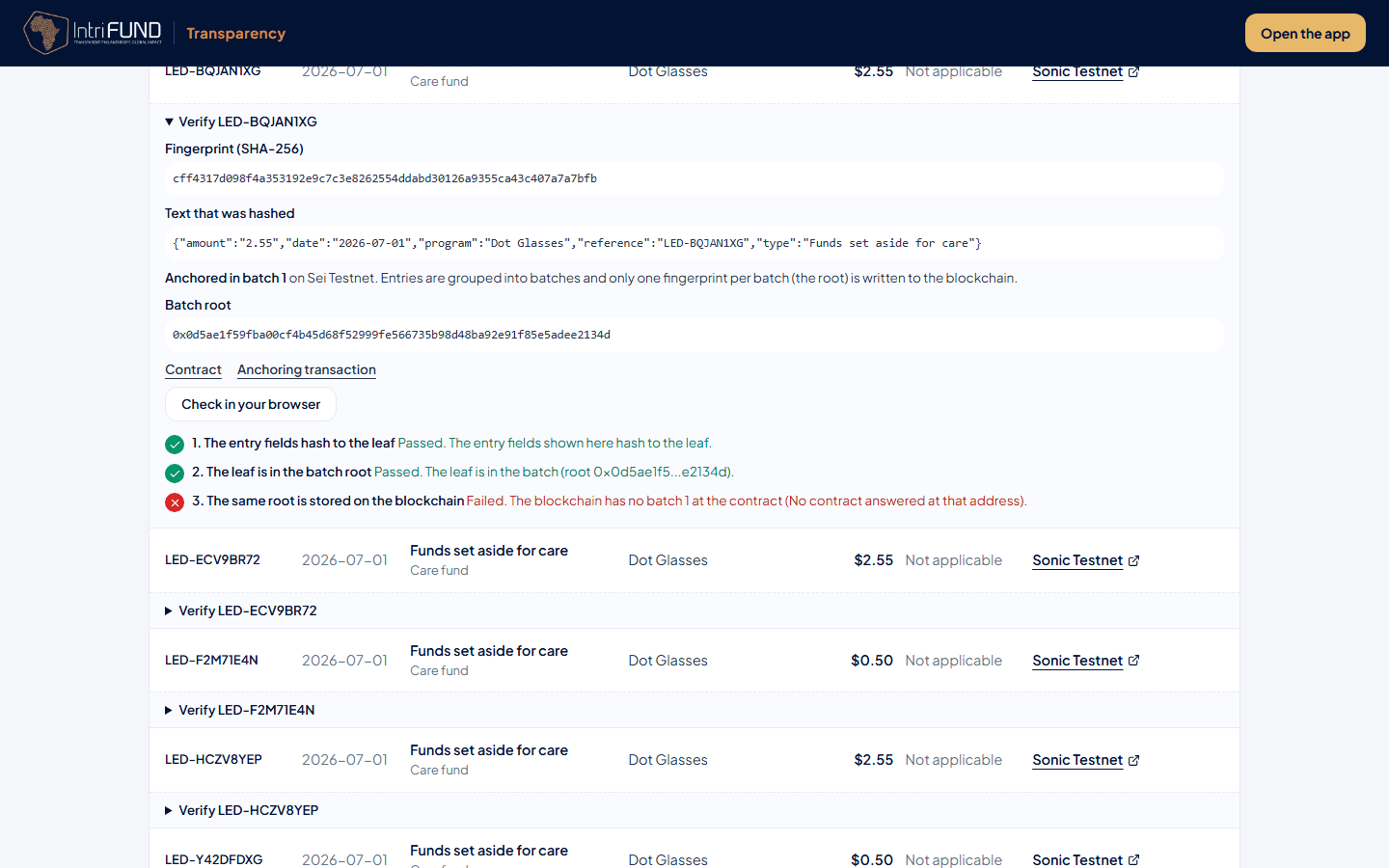
An entry that says Anchored in batch and a number shows the batch root and a Check in your browser button. Press it and read the three checks below.
What the three checks mean
The checks run in your browser, not on our server, so you do not have to trust us for them.
| Check | What your browser does | If it passes |
|---|---|---|
| 1. The entry fields hash to the leaf | Rebuilds the entry’s fingerprint from the public fields shown on the page. | What you see is what was recorded. |
| 2. The leaf is in the batch root | Follows the proof, a short list of other fingerprints, up to the batch root. | Your entry is part of that batch, and nothing was swapped. |
| 3. The same root is stored on the blockchain | Asks the blockchain for the root stored for that batch and compares it. | The batch was published and cannot be changed. |
If a check fails or is not available
- Not available. Step 3 says this when the blockchain cannot be reached from your browser, or the contract is not published yet. Try again later. It does not mean the entry is wrong.
- Failed. A red cross means the figures do not agree, and the line says why, for example that the blockchain has no batch of that number at the contract. Do not assume fraud first: the test network may be down, or the contract address may be wrong. If it still fails later, tell us through FAQ and support.
- Waiting to be anchored. The entry is younger than 24 hours, or waiting for the next batch. There is nothing to check yet.
Related pages
- Transparency and privacy: what the public page shows and how privacy is protected.
- Security and privacy: how we protect your own data.